Whether it is a landscape photo, wedding, or vignette effect, it can add a lot of atmosphere to the photo. Of course, the most important thing is to make the viewers vision more concentrated in the middle of the photo and highlight the subject. What about the effect? Take a look at the following steps!
Before Starting:
- You need to use Photoshop CC for post-production, please click Photoshop CC-Download and install guide to install Photoshop CC first
(1) Open photo in Photoshop

Click to enlarge
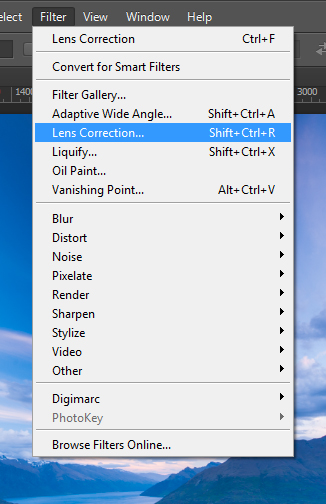
(2) Press Filter> Lens Correction
(3) See the page of Lens Correction, go to “Custom” page

Click to enlarge
(4) Amount under Vignette is reduced to the left and the vignette appears!

Click to enlarge
(5) Adjust Midpoint to make the vignette larger and smaller. Adjust it according to your personal preference.
Once completed, the photos will be more focused!
![Secret to Sharp Handheld Photos [Safe Shutter Speed]](https://fotobeginnerusa.com/wp-content/uploads/2019/09/tan-kaninthanond-rr8DvtQL9X8-unsplash-500x383.jpg)